How to Check SSDI Claim Status and Read What It Says
By Mason ArnaoUpdated

By Mason ArnaoReviewed by Mason Arnao

If you’re figuring out how to check SSDI claim status, the quickest route is your my Social Security account, which shows your claim’s current stage, whether Social Security needs more information from you, and an estimated decision date. You can also call the national number, 1-800-772-1213, which offers automated claim status 24 hours a day, or contact your local office. The status you see mostly tells you where your file is in the process and who is working on it right now.
This guide covers each of those options step by step. You’ll learn how to sign in or set up your account, which works through Login.gov, or ID.me if you live outside the U.S.. You’ll also learn what to have ready before you call or visit. Then we explain the path most first-time claims follow: the field office checks the non-medical requirements, your state’s Disability Determination Services reviews the medical evidence, and the field office issues the decision letter.
If you’ve already appealed, you’ll see how status checks work at reconsideration and at the hearing level, where Social Security has added online case status and hearing notices in the my Social Security Message Center. We finish with practical steps to take if your status hasn’t changed in months.
The quick answer: three official ways to check your SSDI status
You can check your SSDI application or appeal status in three official ways: online through your my Social Security account, through Social Security’s automated phone line, or by calling your local Social Security office. All three cover applications and appeals.
- Online, in my Social Security. According to Social Security’s check-status page, signing in to your account shows what stage your claim is at, whether SSA needs more information from you, and an estimated decision date.
- By automated phone, any time. The same SSA page lists automated status help 24 hours a day, 7 days a week, in English and Spanish, at 1-800-772-1213. When the system asks how it can help, say “application status.” If you are deaf or hard of hearing, the TTY number is 1-800-325-0778. These numbers were current on SSA’s page as of November 2026.
- By calling your local office. You can also call the Social Security office that serves your area. SSA’s phone contact page explains that you can find your local office’s number with its Office Locator.
Which one should you use?
For a quick check, online is usually the easiest. You can look whenever you like, and the account shows the stage of your claim and any request for more information in one place. Phone or office help is a good fit if you cannot use online services, or if you need a person to explain what you are seeing.
If you haven’t filed yet, or you want a refresher on the forms and documents involved, TortAdvisor’s guide to the disability benefits application covers what to gather, how to file online or by phone, and how long decisions take.
Checking online in your my Social Security account
The fastest way to see where your claim stands is your my Social Security account. You can check it any time, and the status covers both your application and any appeal you file later.
What you need to sign in
Social Security doesn’t create the login itself. According to SSA’s my Social Security sign-in page, you create your account through Login.gov, or through ID.me if you live outside the U.S. Each service asks for slightly different things:
| Sign-in service | Who uses it | What you need |
|---|---|---|
| Login.gov | People in the U.S. | An email address, a government-issued photo ID, and a phone number |
| ID.me | People outside the U.S. | An email address, a government-issued photo ID, and a device with a camera |
If you already have a Login.gov or ID.me account, SSA says to sign in with that account instead of making a new one. Keeping one login avoids confusion when you come back to check your claim later.
What the status screen can tell you
Once you’re signed in, SSA’s guide to checking your application or appeal status says the online view shows:
- The stage your application is in, so you know where it is in the process
- Whether more information or documents are needed from you
- An estimate of when a decision will be made
Pay the most attention to the second item. If the screen says Social Security needs something from you, sending it promptly is one of the few parts of the timeline you control.
If you haven’t finished filing yet, or you want the bigger picture before checking status, our full guide to filing an SSDI claim and the appeals ladder covers eligibility, evidence and each level of appeal.
Checking by phone or at your local office, and what to have ready
You can check your status by phone at any hour. Social Security’s national number is 1-800-772-1213. As of November 2026, SSA’s phone page lists hours, wait-time tips and automated services. Staff answer from 8:00 a.m. to 7:00 p.m. local time, Monday through Friday. Automated services run 24 hours a day without waiting for a representative, and “ask to receive a claim status” is one of the options for people who have applied. If you’d rather call your local office directly, the same page links to an Office Locator for local numbers.
Getting your status from the automated line
The automated status line works for both applications and appeals, in English and Spanish. When the system asks what you need, say “application status”. If you are deaf or hard of hearing, the TTY number is 1-800-325-0778.
Best times to reach a person
Sometimes you need a person, for example if a letter asks for something you don’t understand. According to SSA’s phone page, waits are usually shorter:
- in the morning
- later in the week
- later in the month
What to have in hand before you call
Gather these first so one call covers everything:
- Your Social Security number
- The date you applied or appealed
- Your most recent letter from Social Security, which tells the representative where your claim stands
- A pen and paper to write down the date of the call, the name of the person you spoke with and what they told you
Those notes are worth keeping. If you call again later or get help with your claim, you will have a clear record of what you were told and when.

Where your claim actually is: field office, state DDS, then decision
Your status makes more sense once you know the path an initial disability claim follows. SSA describes three steps in processing a disability claim, and your claim is always sitting at one of them:
- Field office: non-medical check. Your local Social Security field office first confirms that you meet the basic requirements that have nothing to do with your health.
- State Disability Determination Services (DDS): medical review. Your claim then goes to a state agency, which looks at whether your medical condition meets Social Security’s disability rules. Every state runs a DDS, and Social Security funds it.
- Field office: decision. The claim returns to the field office, which approves or denies it and sends you the decision letter.
The middle step is the one most people don’t expect. DDS is a state agency, not a Social Security office, so you may hear from an office or phone number you don’t recognize. That’s normal. It means your claim has moved past the first step and someone is reviewing your medical information.
If your state DDS contacts you
Treat any letter, form or phone call from DDS as a priority:
- Reply promptly to questionnaires and requests for information.
- Keep any appointment it schedules, or call right away if you truly can’t make the date.
- Tell DDS about new treatment, such as a new doctor, test or hospital stay, so it has a complete picture of your condition.
While DDS is gathering medical evidence, answering these requests is often what keeps your claim moving. Sometimes DDS also asks you to see a doctor it arranges. If that happens, it helps to understand why SSA may send you to its own doctor for a consultative exam and what to expect before you go.
Checking status during reconsideration and the hearing stage
If you have appealed, you check your status the same way you did for your original application. SSA’s check application or appeal status page covers both applications and appeals. That means your reconsideration request is tracked through the same my Social Security account and the same automated phone line. If you are wondering whether your wait is normal, here is how long SSDI reconsideration usually takes.
What you can see once you request a hearing
In July 2026, SSA announced online case status at the Hearings and Appeals levels. The tool is for people with a pending disability claim, an appeal or a recently decided claim. SSA named three kinds of hearing-level updates:
- Receipt: a notice when the hearing office receives your Request for Hearing
- Case preparation: updates as the office reviews information and prepares your case
- Decision: an update when a decision is issued
Check your Message Center, too
SSA also said hearing-related notices can be viewed in the my Social Security Message Center. These include the Notice of Hearing, Postponement of Hearing and Amended Notice of Hearing, among others. When you sign in, look at both your case status and your messages. A change to your hearing date or details may appear as a notice rather than as a status update.
If a notice uses terms you do not recognize, this guide explains what hearing-stage status and notice wording means. Once your Notice of Hearing arrives, you can turn to how to prepare for your SSDI hearing before a judge.
When your status hasn’t changed in months
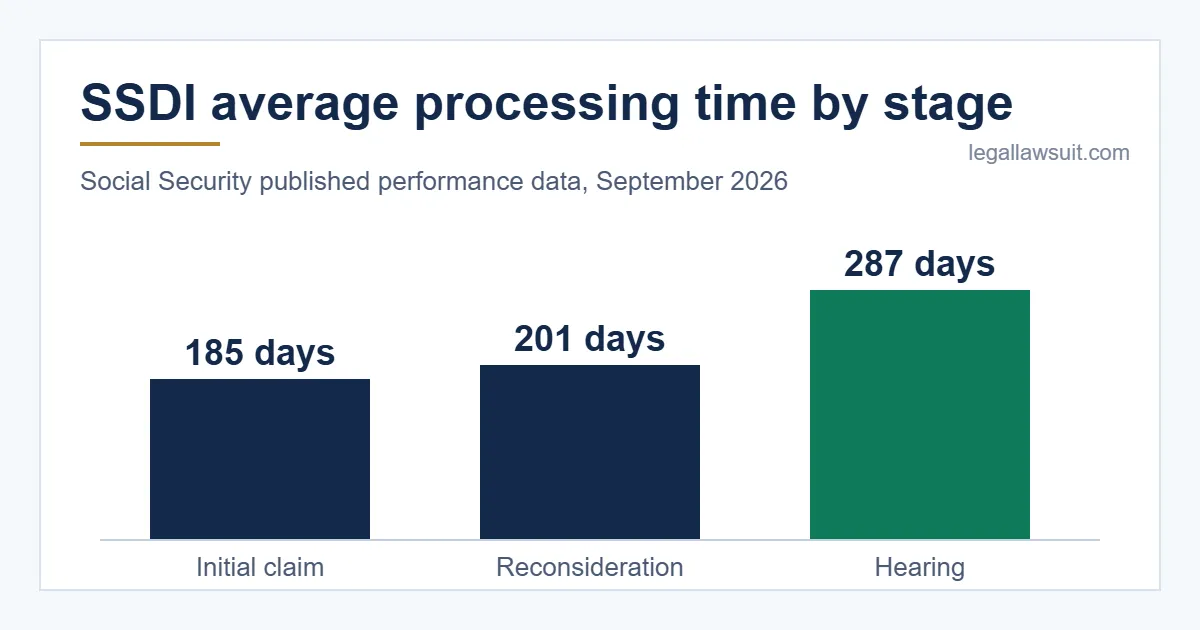
A status that hasn’t moved in months is often still within the normal range. Social Security’s phone contact page says disability applications take an average of 200 to 230 days to review your information and medical records, and the decision then arrives as a letter in the mail. Before assuming something has gone wrong, compare your dates with our guide to SSDI wait times at each stage, from initial claim to hearing.
Simple checks you can do now
- Look for requests in your account. Check whether Social Security has asked you for information or forms you haven’t sent yet.
- Confirm your contact details. Make sure Social Security has your current mailing address and phone number. Your decision letter goes by mail, and the agency may need to reach you about your file.
- Call to confirm nothing is missing. Ask the national number or your local office whether anything is outstanding in your file. Many initial claims spend a long stretch at the state Disability Determination Services office. That office handles the medical review before the field office issues the decision letter, so it can help to ask which step your claim is in.
When a representative may help
Many people handle the waiting period on their own. It may be worth getting help in a few situations:
- Social Security says it is waiting on medical records you can’t get.
- You’ve received a denial and an appeal deadline is approaching.
- You’re getting ready for a hearing.
If cost is a concern, our guide explains how SSDI representative fees are capped and paid.
Legal Lawsuit can help you understand your options at this point. We are not a law firm, and no one can promise how your claim will turn out. We can help you sort out what to ask and who to ask.
Frequently asked questions
Can I check my SSDI status without a my Social Security account?
Yes. You can use Social Security’s automated phone line at 1-800-772-1213 at any hour, any day, in English or Spanish. When the system asks what you need, say “application status.” If you use a TTY, call 1-800-325-0778. According to Social Security’s guide to checking application or appeal status, these options work for both applications and appeals.
What do I need to create a my Social Security account?
You create the account through Login.gov. If you live outside the U.S., you use ID.me instead. Either way, plan to have an email address, a government-issued photo ID, and either a phone number or a device with a camera. If you already have a Login.gov or ID.me account, you can sign in with it, as explained on the my Social Security sign-in page.
Can I see my hearing notices online?
Yes. Social Security has added online case status for the Hearings and Appeals levels. You get a notice when your Request for Hearing is received, updates while your case is being prepared, and an update when a decision is issued.
Hearing notices also appear in your my Social Security Message Center. These include the Notice of Hearing, Postponement of Hearing, and Amended Notice of Hearing.
Will the status screen tell me if I was approved?
Treat the status screen as a progress tracker, not the final word. In an initial claim, the field office makes the final step after the medical review. It approves or denies the claim and issues the decision letter, as described in Social Security’s explanation of disability processing steps. Read that letter closely. It is the official record of the decision and explains what comes next.
What are the best times to call SSA about my claim?
The national number, 1-800-772-1213, is staffed from 8:00 a.m. to 7:00 p.m. local time, Monday through Friday. Social Security says wait times are usually shorter in the morning, later in the week, and later in the month.
If you only need a quick status check, the automated service on the same number is available 24 hours a day, so you don’t have to wait for a person.
Sources
- Check application or appeal status · Social Security Administration
- Contact Social Security By Phone · Social Security Administration
- Disability determination processing time · Social Security Administration
- my Social Security · Social Security Administration
- Social Security Administration Announces New Online Tools and Notices for Disability Claims · Social Security Administration · 2026-07-21
This article is general information, not legal advice. Laws and deadlines vary by state and change over time; check the linked sources or speak with a licensed attorney about your situation.
Related Posts

Waiting after your hearing? Learn which timing figures actually apply, where to check your status, and how to read the decision when it arrives.
Find SSA’s official online starting point, understand which appeal materials belong together, and learn what to keep after submitting your request.
Right now the average SSDI disability claim takes about 185 days at the initial stage, about 201 days at reconsideration, [...]